[ ] ( )
Markdown editor · Tauri + Rust
Toril — a bull's head fused with a fountain-pen nib

Toril

A desktop markdown editor.

Your markdown renders in place as you type — no separate preview pane — and your files stay plain .md in ordinary folders, so a workspace can be a live Obsidian vault.

Free & open source · Apache-2.0 · beta · Windows, macOS, Linux

It is a tool, and it does one job.

Toril edits markdown. The editing surface is the rendered surface, so there is no split pane and nothing to keep in sync. It is built on Tauri and Rust, which means a native binary rather than a bundled browser. It is beta software: the editor works and is used daily, and there are still rough edges. Keep backups of anything important.

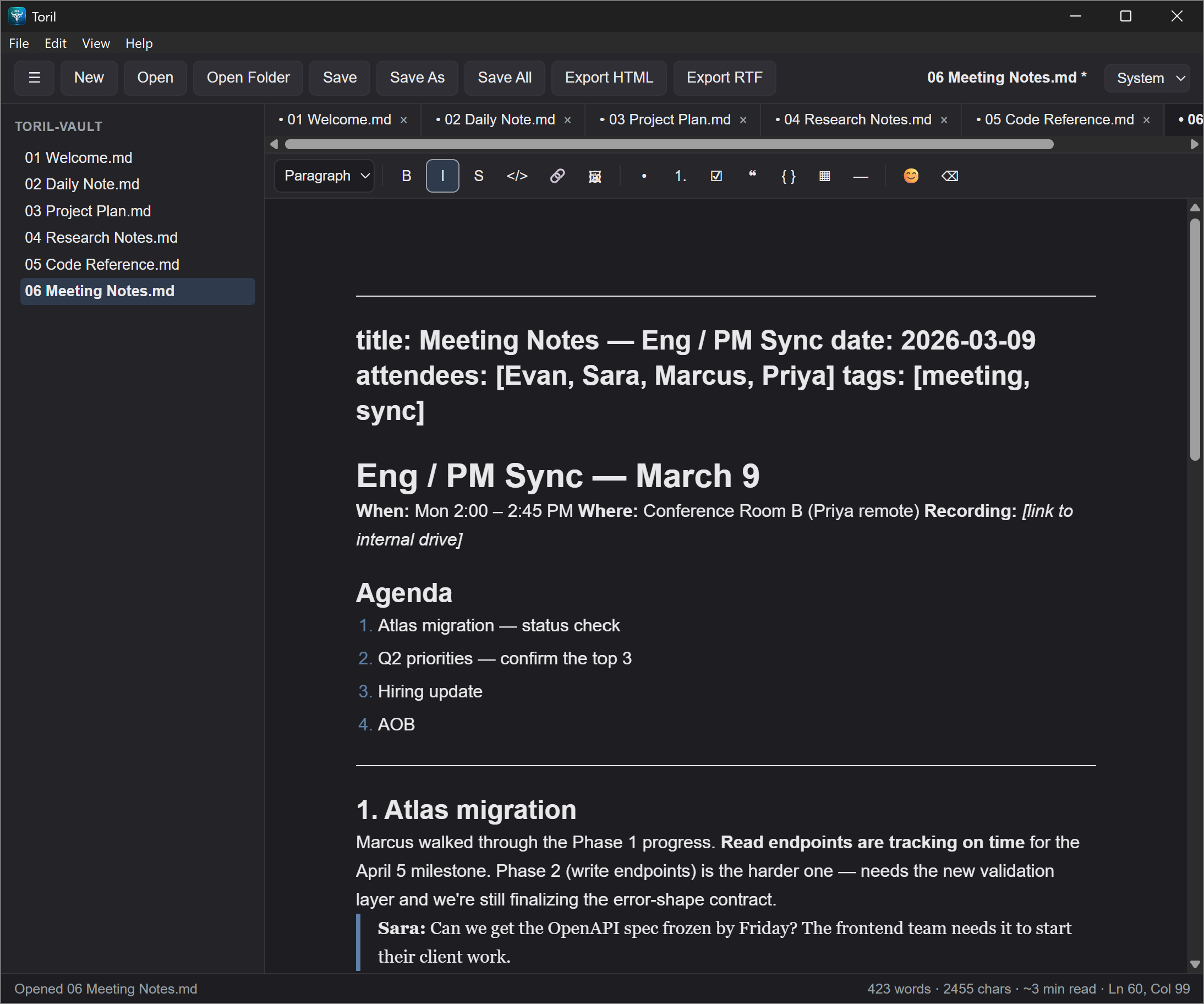
Toril editing a Markdown document: a workspace sidebar on the left, a document tab bar, and headings, lists and code rendered inline in the editor.
Toril editing a document — the rendered surface is the editing surface.
What's inside

What the current build does

This is what you get when you download it today. Anything not listed here is either deliberately absent or not written yet — both are covered further down.

Live WYSIWYG

Type and the line becomes a heading — in place. No split pane, no preview lag. The page is the preview.

CommonMark and GFM

Tables, task lists, footnotes, and strikethrough, plus emoji shortcodes — rendered inline as you type.

HTML, not just Markdown

Open, edit, and save .html files in the same editor. Markup is sanitized as it loads, so nothing in a file can run.

Plain text, portable

Your notes are ordinary .md files in ordinary folders. Stop using Toril tomorrow and every note still opens in anything.

Export to HTML and RTF

A standalone HTML document with the active theme inlined, or RTF for a word processor.

Paste images

Paste an image from your clipboard and Toril writes it beside the document, then links it.

Sidebar, tabs, file watcher

A workspace tree and multiple open documents, with a watcher that notices edits made outside the editor. It reopens your last folder and files on launch.

Atomic saves

Every write is a temp file, an fsync, then a rename — so a crash mid-save cannot corrupt an existing note. Nothing is sent anywhere; there is no account and no telemetry.

Just as important

What it doesn't do

Some of this is deliberate and permanent. Some is simply not built yet. The difference matters, so they are listed apart.

By design

  • No account, no cloud sync, no backend, no telemetry — Toril does not phone home.
  • No proprietary container or sidecar database.
  • No plugin system, and none planned.
  • No mobile app.

Not yet built

  • Math rendering (KaTeX), PDF export, and in-editor YAML front matter.
  • Search across a whole vault, wikilinks, and backlinks.
  • Signed installers — Windows SmartScreen and macOS Gatekeeper warn on first run. That is expected for an unsigned build, not a sign of a problem.
Where it's going

Data safety first, then features.

Current work is a floor to stand on: autosave and crash recovery, local version history, safe delete, and coexisting cleanly with folders that Obsidian or a sync client is also writing to. Search, wikilinks, and backlinks come after that — a tool you keep notes in has to be trustworthy before it is clever.

An AI assist layer is planned further out, built around your own API key or a local model. None of it is written yet, and nothing in Toril talks to a network today.

The name: in the Spanish bullring, el toril is the pen where the bull waits before it charges — a nod to Tauri (the bull) and to writing (the pen).
Built on
Tauri · native shell Rust · core & file I/O TypeScript · frontend Milkdown · WYSIWYG engine

Download

Installers for Windows, macOS, and Linux are on the releases page, or you can build it from source. It's free, Apache-2.0, and there's nothing to sign up for.

v1.0.0-beta.1 · Windows is the primary platform; macOS and Linux build from the same stack and get less testing